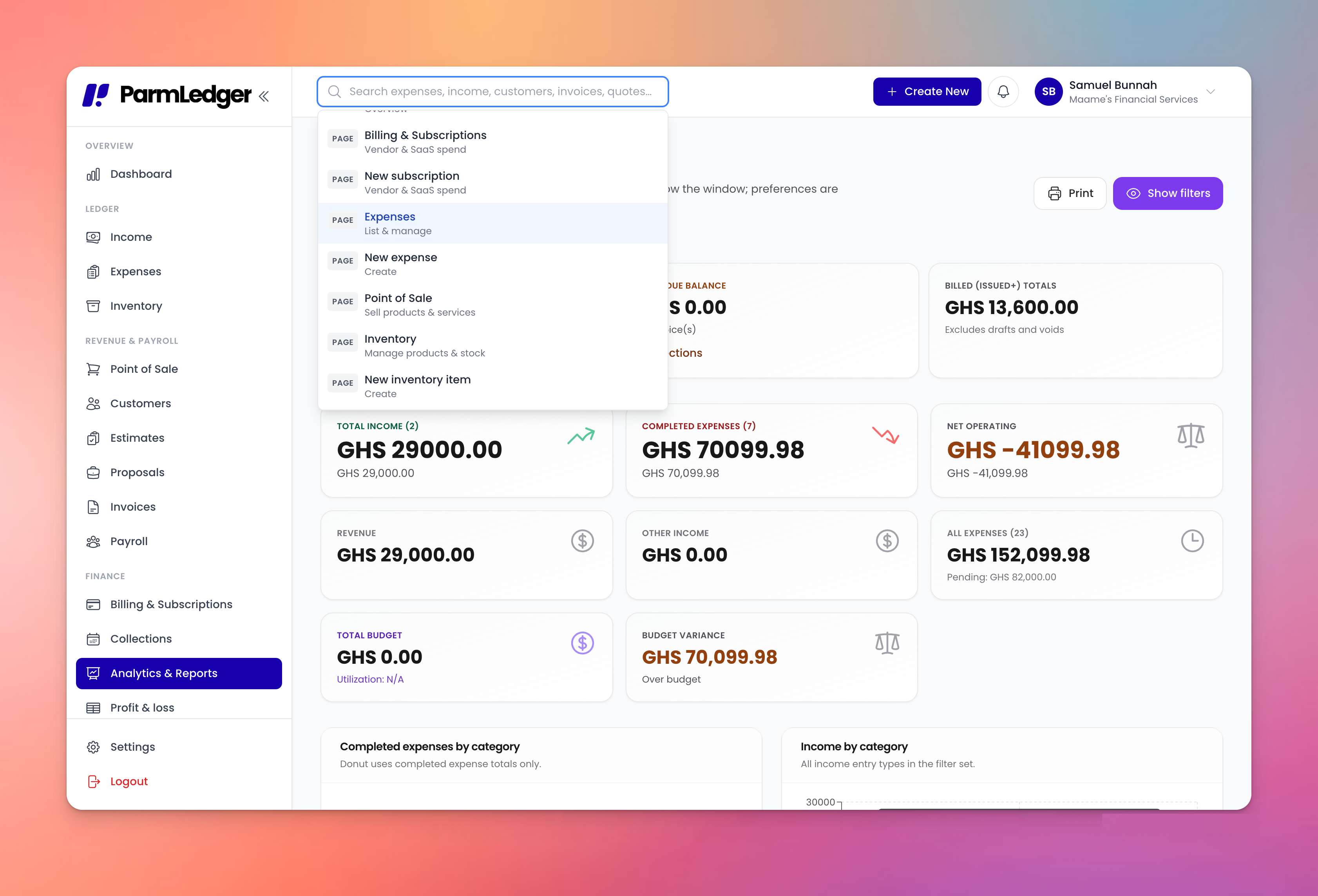
ParmLedger is a cloud-based finance and accounting management platform designed to help businesses manage financial operations from a centralized workspace.
It combines accounting, financial management, invoicing, expenses, approvals, reporting, payroll, general ledger and payment workflows rather than forcing businesses to manage each process in a separate system.
For SMEs in Ghana, this is particularly useful when financial transactions are spread across bank accounts, Mobile Money, payment gateways, spreadsheets and different business applications.
What Are the Main ParmLedger Features?
ParmLedger provides a broad set of financial management capabilities designed to connect day-to-day transactions with accounting and reporting.
1. Expense Management
Businesses can record, categorize and monitor expenses while maintaining supporting documentation such as receipts.
For organizations with multiple approval levels, expense workflows can help ensure that spending is reviewed before it reaches the accounting records.
2. Income Management
ParmLedger helps businesses track revenue and organize income streams so management can see where money is coming from.
This is particularly useful for businesses with multiple products, branches, projects or revenue sources.
3. Professional Invoicing
Businesses can create professional invoices, monitor outstanding balances and manage customer collections.
Recurring invoicing is useful for:
Monthly retainers
Subscription businesses
Maintenance contracts
Professional services
School fees or recurring charges
Long-term customer agreements
4. Accounts Receivable and Payable
ParmLedger helps finance teams keep track of money owed by customers and obligations owed to suppliers.
This gives management better visibility into:
Outstanding invoices
Supplier bills
Expected collections
Upcoming payments
Working capital requirements
5. Cash Flow Management
Profit does not automatically mean a business has cash available.
A company may record strong sales while still struggling to pay suppliers because customers have not paid.
Cash-flow visibility helps business owners understand money coming into and leaving the organization.
6. Financial Reporting
ParmLedger supports financial reporting such as:
Profit and Loss statements
Balance Sheets
Cash-flow reporting
Trial Balance
Financial dashboards
Management analytics
These reports help move financial management away from guesswork and toward evidence-based decisions.
7. Approval Workflows
Businesses can create structured approval processes for financial activities.
For example: Employee submits expense → Department manager reviews → Finance approves → Transaction is recorded
This can be especially valuable for companies where financial controls become more important as the team grows.
8. General Ledger and Reconciliation
ParmLedger includes general-ledger functionality, chart-of-accounts management, journal posting and reconciliation workflows.
This means businesses can move beyond simply tracking expenses and income toward maintaining structured accounting records.
9. Audit Trails and User Permissions
Financial systems should answer three questions:
Who changed it? What changed? When did it change?
Audit trails and role-based permissions help businesses strengthen accountability and control access to sensitive financial information.
10. Payroll and Local Finance Workflows
For businesses operating in Ghana, ParmLedger also supports payroll workflows with Ghana-specific SSNIT settings and statutory deductions.
What Software Is ParmLedger Compatible With?
ParmLedger supports integrations with several business and financial platforms, including:
Software / Platform | Primary Use | How It Fits With ParmLedger |
|---|---|---|
Paystack | Online payments | Customer payment collection |
Flutterwave | Online payments | Payment links and collections |
Stripe | Global payments | International payment workflows |
QuickBooks | Accounting | Accounting data connectivity |
Salesforce | CRM | Connecting customer/business workflows |
Email providers | Communication | Financial communication workflows |
Ghana banks | Banking | Bank transaction connectivity |
MTN Mobile Money | Mobile payments | Transaction import and reconciliation |
The exact capabilities of an integration can vary by module, account configuration and the specific connection available at the time of use.
How Does ParmLedger Work With Payment Platforms?
Payment platforms are important because receiving money is only one part of financial management.
The accounting process also needs to answer:
Who paid?
What invoice did they pay?
How much did they pay?
When did they pay?
Was the payment complete?
Where should the transaction be recorded?
Has the receivable been cleared?
ParmLedger connects payment workflows with financial records so businesses can move closer to having one financial source of truth.
Can ParmLedger Work With QuickBooks?
Yes. ParmLedger supports QuickBooks integration.
This can be particularly relevant for businesses transitioning from another accounting environment or maintaining workflows that involve QuickBooks.
However, integration should not automatically mean that every record in one platform is duplicated into another.
Before connecting systems, determine:
Which system is the primary source of truth.
Which transactions need synchronization.
Which system owns customer records.
Which system owns the general ledger.
How duplicate records will be prevented.
How historical data will be handled.
A good integration reduces administrative work. A poorly configured integration can simply move the same problem from one system to two systems.
Can ParmLedger Integrate With Salesforce?
Yes. Salesforce is among the supported ParmLedger integrations.
CRM and accounting systems serve different purposes. A CRM primarily manages customer relationships, leads, opportunities and sales activities. Accounting software manages financial transactions, invoices, payments, receivables and financial reporting.
Connecting the two can create a stronger customer-to-cash workflow.
For example: Sales opportunity → Customer agreement → Invoice → Payment → Financial record
This reduces the gap between what the sales team knows and what the finance team knows.
Does ParmLedger Work With Banks and Mobile Money?
For Ghanaian businesses, this is one of the most important areas of financial software compatibility.
ParmLedger supports bank transaction connectivity and MTN Mobile Money transaction workflows.
This matters because many Ghanaian businesses receive and make payments through a combination of:
Commercial bank accounts
Corporate bank accounts
Mobile Money
Payment gateways
Cash
Card payments
Instead of treating these as completely separate financial worlds, businesses can bring transaction information into a structured finance workflow.
Who Should Use ParmLedger?
ParmLedger is suitable for businesses that have outgrown basic spreadsheets or disconnected financial tools.
Small Businesses in Ghana
A growing shop, agency or professional service business can use ParmLedger to manage expenses, invoices, payments and reporting without immediately adopting a complex enterprise ERP.
Startups
Startups often begin with spreadsheets and basic payment tools.
As transaction volume increases, financial controls become increasingly important.
ParmLedger can provide a structured environment for:
Expense approvals
Customer billing
Financial reporting
Cash-flow monitoring
Team permissions
Accounting records
Retail Businesses
Retail businesses can benefit from transaction visibility, payment connectivity, expense tracking and financial reporting.
Manufacturing Companies
Manufacturers typically have more complicated spending structures involving suppliers, production expenses, payroll, inventory and operational costs.
A centralized financial system can make these processes easier to monitor.
NGOs, Schools and Churches
Organizations that manage funds from multiple sources need strong financial accountability.
Approval workflows, payment records, role-based permissions and audit trails can help strengthen internal controls.
Professional Service Firms
Consulting firms, agencies, software companies and other service businesses can use recurring invoices, payment tracking, expense management and project-related financial reporting.
What Are the Benefits of Integrating Accounting Software?
The most important benefit of integration is not simply automation.
It is continuity of information.
A properly connected financial technology stack can help businesses:
Reduce duplicate data entry
The same customer or transaction should not have to be manually entered into multiple systems unnecessarily.
Improve financial visibility
Management can make decisions using more current financial information.
Strengthen internal controls
Approval workflows and role-based permissions can reduce uncontrolled financial activity.
Improve reconciliation
Bank, Mobile Money and payment information can be compared against financial records more systematically.
Support better cash-flow management
Businesses can see outstanding receivables and expected payments more clearly.
Scale operations
As transaction volumes grow, automated workflows become increasingly valuable.
Common Mistakes When Connecting Business Software
Integration is powerful, but businesses can still make mistakes.
Mistake 1: Connecting everything without a strategy
More integrations do not automatically create better operations.
Start with the workflows that create the most manual work.
Mistake 2: Having multiple sources of truth
If finance, sales and management each maintain different versions of the same customer or transaction data, reporting becomes unreliable. Define ownership for each type of information.
Mistake 3: Ignoring reconciliation
Automation does not eliminate the need for financial controls.
Transactions still need to be reviewed and reconciled.
Mistake 4: Giving everyone full access
Financial information is sensitive.
Use role-based permissions so employees only access the information necessary for their responsibilities.
Mistake 5: Migrating bad data
Moving inaccurate spreadsheets into new software does not fix the underlying data.
Clean historical records before importing them.
Best Practices for Using ParmLedger With Other Software
Follow these five principles.
1. Start with the financial workflow
Map the journey from:
Sale → Invoice → Payment → Reconciliation → Accounting → Reporting
2. Identify your system of record
Decide which platform owns customer, payment and accounting information.
3. Standardize categories
Use consistent customer names, expense categories, accounts and transaction references.
4. Reconcile regularly
Do not wait until the end of the financial year to discover inconsistencies.
5. Review permissions
Access should reflect job responsibilities.
An employee who submits expenses does not necessarily need access to financial reports or payroll.
ParmLedger Compatibility Checklist
Before choosing or implementing financial management software, ask:
Does it support my payment providers?
Can I connect relevant bank transactions?
Does it support Mobile Money where required?
Can it connect with my accounting tools?
Can it connect with my CRM?
Can I import Excel or CSV data?
Does it provide professional invoicing?
Does it track accounts receivable?
Does it track accounts payable?
Can employees have different permissions?
Is there an audit trail?
Can I generate financial reports?
Can I reconcile transactions?
Does it support my local financial workflows?
Can the platform grow with my business?
Frequently Asked Questions
1. What is ParmLedger?
ParmLedger is a cloud-based finance and accounting management platform designed to help businesses manage expenses, income, invoices, payments, approvals, accounting records and financial reporting.
2. What software does ParmLedger integrate with?
ParmLedger supports integrations including Paystack, Flutterwave, Stripe, QuickBooks, Salesforce and email providers. It also supports bank and MTN Mobile Money transaction connectivity.
3. Does ParmLedger work with QuickBooks?
Yes. QuickBooks is among the accounting platforms supported through ParmLedger integrations.
4. Does ParmLedger support Paystack?
Yes. Paystack is supported for payment workflows, including customer payment collection.
5. Does ParmLedger support Flutterwave?
Yes. Flutterwave is a supported payment integration.
6. Can ParmLedger work with Stripe?
Yes. Stripe is supported, making the platform relevant to businesses that collect payments through Stripe-enabled workflows.
7. Does ParmLedger integrate with Salesforce?
Yes. Salesforce is among the supported integrations, allowing businesses to connect CRM-related workflows with financial operations.
8. Can ParmLedger connect to Ghanaian banks?
ParmLedger supports bank transaction connectivity for Ghanaian businesses, helping finance teams bring banking activity into their reconciliation and accounting workflows.
9. Does ParmLedger support MTN Mobile Money?
Yes. ParmLedger supports MTN Mobile Money transaction connectivity, which is particularly relevant for businesses operating in Ghana.
10. Can I import Excel or CSV data into ParmLedger?
Yes. ParmLedger supports spreadsheet-based data imports, which can help businesses migrate information from existing Excel or CSV records.
11. Is ParmLedger suitable for small businesses in Ghana?
Yes. ParmLedger is designed for businesses ranging from small companies and startups to larger organizations. Its modular approach allows businesses to use the capabilities relevant to their stage and operational needs.
12. Can accountants use ParmLedger?
Yes. ParmLedger includes accounting-oriented functionality such as general ledger, chart of accounts, reconciliation, financial statements, audit trails and financial reporting.
13. Can ParmLedger replace Excel for accounting?
For businesses using spreadsheets for core financial operations, ParmLedger can provide a more structured alternative with accounting workflows, permissions, approvals, reporting and auditability.
However, Excel can still remain useful for analysis, budgeting or specialized calculations.
14. Is ParmLedger suitable for businesses outside Ghana?
Yes. ParmLedger is built for African and global SMEs and supports multi-currency capabilities and international payment integrations. Businesses should still evaluate the platform against their specific country's tax, accounting and regulatory requirements.
15. Should every business integrate all its software?
No. Businesses should integrate the systems that support their most important workflows. Too many unnecessary integrations can increase complexity rather than reduce it.
Ready to Bring Your Business Finances Into One System?
If your business is still managing invoices, expenses, payments, approvals and financial reports across spreadsheets and disconnected applications, it may be time to simplify the workflow.
Explore ParmLedger and see how a centralized finance platform can help your business track, manage and understand its finances more effectively.